TechPotent Outbound
How it works

Your AI team does the research, the writing and the replies. You decide how much you want to see.

Every email is checked against its sources before it leaves. Interested buyers are answered in under 5 minutes. Switch to Review replies or Review everything at any time.

  • Sends from your own domain
  • Every fact checked against its source
  • Autopilot, or approve first: your choice
  • You own the mailboxes, the data and every email
In 3 steps

From one call to meetings on your calendar

1

Learn your business

  • One discovery call about your market and your best customers.
  • Your ideal buyer, your 4 meeting criteria and your approved facts, written down for you to approve.
  • Your voice, learned from 3 or more of your own emails.
2

Find and write

  • Companies at a buying moment: hiring, growing, new leaders, past champions.
  • One person per company, still in the role, address checked 2 ways.
  • Email 1 with a dated reason, then up to 6 follow-ups, about every 3 to 4 days.
3

Answer and book

  • Replies read and answered from your approved facts in under 5 minutes.
  • Meetings checked against your 4 criteria, booked in the buyer's time zone.
  • A brief for your closer, and your calendar and CRM updated.
The AI team

24 AI agents in 6 stages, each with one job

Each agent has a plain name, one job and its own checks. They work in a fixed order every 15 minutes, replies first.

Your AI team checks every 15 minutes, in a fixed order: answer replies, send what is due, write, find new buyers, then learn.

1Learn your business

What you sell, who buys it and how you sound.

  • Business ProfilerWorks out your ideal buyer from your best customers and sets the 4 meeting criteria.
  • Buying Moment PlannerPicks the buying moments worth watching and builds your first audiences.
  • Voice and Facts KeeperLearns how you write and keeps the facts and stories you approved.

2Find buyers

Companies with a reason to buy now, matched to your best customers.

  • Company FinderFinds companies that match your ideal buyer.
  • Hiring WatcherWatches public job posts for the roles that show a need.
  • News WatcherSpots new sites, contracts, funding, product lines and new owners.
  • Website ReaderReads each company's own website for its people, products and news.
  • Warm Lead WatcherSpots past champions who moved and paused deals worth reopening.
  • Fit ScorerScores each company against your best customers and fills your audiences.

3Check contacts

The right person at each company, with a checked address.

  • Right Person FinderFinds the one person who owns the problem and checks they still work there.
  • Email FinderFinds each person's work email address from reliable sources.
  • Email CheckerChecks every address 2 ways before anything is sent to it.
  • Do-Not-Contact GuardKeeps opt-outs and your do-not-contact list out of every send, within 1 hour.
  • Mailbox BuilderSets up and warms new mailboxes on your own domain and keeps each one under its daily cap.

4Write

One email per buyer, each with a dated reason to write.

  • Playbook WriterTurns your facts and the Writing Playbook into approved lines for every buying moment.
  • ResearcherFinds the dated, sourced reason to write to each buyer.
  • Email WriterWrites email 1 and the follow-ups in your tone and your voice.
  • Quality CheckerChecks every email before it leaves and fixes or stops the ones that are not good enough.

5Send safely

From your own domain, inside each buyer's working day.

  • Send SchedulerSends inside the buyer's working day and stops the moment anyone at the company replies.
  • Inbox Health GuardWatches inbox rate, bounces and spam reports, and pauses a mailbox before it can cause harm.

6Turn replies into meetings

Replies answered in minutes, meetings qualified and booked.

  • Reply ReaderReads every reply and works out what it means.
  • Reply WriterAnswers from your approved facts in under 5 minutes, with 2 times to meet.
  • Meeting QualifierChecks the 4 meeting criteria, books the meeting, briefs your closer and updates your CRM.
  • Results AnalystReports the week and feeds what worked back into targeting and writing.

Behind the scenes, our quality team reads 50 emails a day, on top of the quality check every email passes.

What the AI does

The work your AI team does every day

A research brief per company

Why now, why them and who to talk to, each with its source and date.

Buying moments

Every target company watched every 15 minutes for the moments that show a need.

Fact-checked first lines

Every observation linked to its source; nothing outside your approved facts can be sent.

The Writing Playbook

12 proven frameworks and rules for length, reading level, subject and one question, with the framework named on every email.

8 tones and your voice

Confident by default, or any of the 8; your voice learned from your own emails.

A quality check on every email

Word count, reading level, phrases to avoid, unsupported claims, tone and footer, with every stopped email and the reason.

Tests that improve themselves

Every email has versions; a winner takes more volume after 300 sends each and 95% confidence.

Replies in minutes

Interest, questions, objections, referrals, out-of-office and opt-outs, each handled; opt-outs removed everywhere within 1 hour.

Meetings qualified automatically

Checked against your 4 criteria with the evidence, booked in the buyer's time zone, with a brief for your closer.

Email health that repairs itself

Warm-up, daily caps, automatic pause and resume.

What we learned

What won replies and meetings this week changes targeting and writing next week.

Ask Outbound

Ask any question in plain words, such as "meetings next week", and get the answer with a link.

Describe your audience

Type a sentence; the audience builds itself and shows the count and 5 real example companies.

You choose how it runs

Autopilot by default. Approve first if you prefer.

We suggest starting with Review replies for 2 weeks, reading what the AI team writes, then switching to Autopilot. One switch, at any time.

Our default

Autopilot

Our AI team runs everything end to end: finds buyers, writes, sends, answers replies and books meetings. You just take the meetings.

Review replies

Everything runs automatically, but answers to interested buyers wait for your OK first.

Review everything

New email series, answers to replies and meetings all wait for your OK before they go out.

  • On every mode, every email is fact-checked and passes the quality check.
  • Pricing, contracts, legal questions and complaints always go to a person.
  • One button pauses everything, at any time.
What you see

A tour of the platform

Screens from the sample client, Ridgeway Motion Systems. Use the tabs or the arrows.
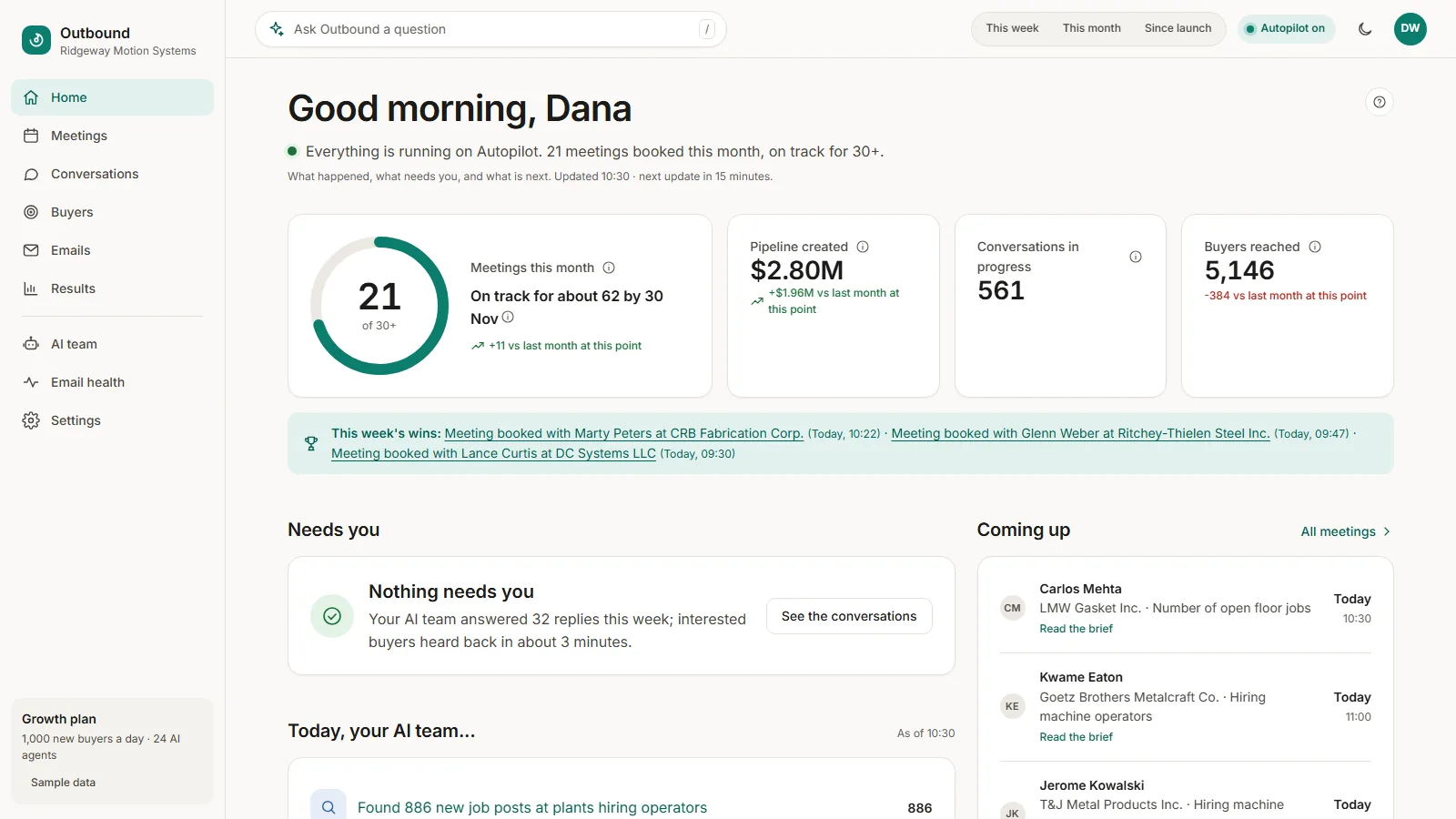
The Home screen of the sample client, saying everything is running on Autopilot, with this month's meetings and today's work. Sample client

The one-line status

Every page opens with a plain answer: is everything running, and how many meetings so far this month.

Your first weeks

Set up in 5 working days. First emails in week 3, full volume by week 6.

New mailboxes on your own domain need time to warm up before they send, so we say so plainly. The meetings floor applies from the first full month at full volume.

  1. 1
    Week 1

    Discovery call, your ideal buyer, your first audiences and email series written, mailboxes created on your domain and warm-up started.

    Your part: the discovery call, then approve your ideal buyer, your facts and your voice card. About 2 hours in all.

  2. 2
    Weeks 2 to 3

    Mailboxes warm up while the AI team researches your first buyers. First emails go out in week 3 at a gentle volume.

    Your part: nothing. Read the first emails if you like.

  3. 3
    Weeks 4 to 6

    Volume steps up each week after 7 clean days. First meetings arrive.

    Your part: take the meetings.

  4. 4
    Week 6 onwards

    Full daily volume for your plan, and the meetings floor applies.

    Your part: take the meetings.

We never use look-alike domains or a pool of pre-warmed mailboxes, so the ramp is the honest time it takes to send safely from your own domain.

See the first 50 buyers we would write to while your mailboxes warm up.

After the first weeks

What your Techpotent team does

Your AI team does the daily work. Your Techpotent team sets it up, watches the quality and talks to you.

Every week

  • Reads 50 emails a day behind the scenes, on top of the quality check.
  • Sends your Monday report by 09:00 your time.
  • Reviews what we learned and agrees changes with you.
  • A dedicated account manager from Growth up, named when you sign.
Next step

See your first 50 buyers before you decide anything

Tell us who you sell to. Our AI team finds 50 real companies in your market, each with the buying moment and its source, the person we would write to and why, and the complete first email for 5 of them. Free, and yours to keep.

  • 50 buyers in your market, each with a dated reason to write.
  • The first email we would send 5 of them, with "Why this email works".
  • Prepared by our AI team and checked by a person.
  • No email series afterwards: one follow-up from a person.
Free, no commitment

See your first 50 buyers

Tell us who you sell to. Our AI team finds 50 real companies in your market, each with the buying moment and its source, the person we would write to and why, and the complete first email for 5 of them with "Why this email works". Checked by a person before it reaches you.

Titles, company type and places are enough.

We use your details only to prepare your buyers and to follow up once. We never add you to an email series.

Before you go

Take the cold email writing playbook

The 12 frameworks and the writing rules our AI team writes with, each with an example. Useful whether or not you ever work with us.